Dotfonto: Transforming Early Childhood Education and Publishing
In the world of early childhood education and publishing, the bridge between play and learning is often built with ink and paper. As creators, educators, and publishers, we constantly seek tools that not only engage young minds but also facilitate genuine skill acquisition. One of the most persistent challenges in this niche is creating effective handwriting practice materials. Traditionally, this involves tedious hours manually creating dotted lines in design software—a process that is prone to human error and inconsistency. This is where Dotfonto steps in, offering a specialized premium font solution that turns the keyboard into a precise tool for early education.
The Mechanics of Dotfonto: A Technical Marvel for Educators
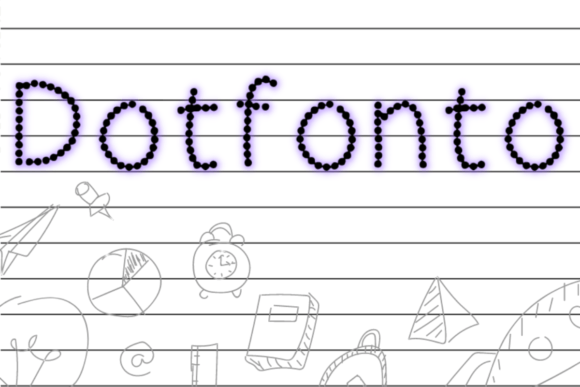
At its core, Dotfonto is a creative font engineered specifically for handwriting practice. Unlike standard display typefaces designed for headlines or body text, this typeface serves a functional purpose. When you type a letter or number using Dotfonto, it renders as a series of connected dots. This visual approach guides the child’s hand, allowing them to trace the shape of the letter without the visual clutter of solid lines. It is a modern typography solution that respects the developmental needs of children learning fine motor skills.
What sets Dotfonto apart from other educational resources is its completeness. It typically includes a full character set covering upper and lower case letters, as well as numbers. This ensures consistency across your entire workbook. Whether you are designing a cover for a KDP activity book or creating printable worksheets for a classroom, the visual language remains uniform. The font’s style is inherently friendly and approachable, avoiding the rigid, sterile look of standard sans-serif educational guides. It strikes a balance between instructional clarity and playful aesthetics, making the learning process feel less like a chore and more like a game.
Practical Applications: Beyond the Worksheet
While the primary use case for Dotfonto is obviously creating tracing sheets, its utility extends into various commercial and creative sectors. For publishers and entrepreneurs in the low-content book market, this font is a game-changer. You can rapidly prototype and produce children’s activity books, reducing production time significantly. Instead of vectorizing individual letters, you simply type your content, adjust the size, and your layout is ready for print.
Graphic designers and brand strategists working with children’s brands will also find value here. If you are developing a brand identity for a preschool, a toy company, or an educational app, Dotfonto can be used in marketing materials to evoke a sense of learning and growth. Imagine using this dotted style in the background of a social media graphic or as a subtle texture in packaging design for school supplies. It communicates that a brand is invested in development and education without using cliché imagery.
Furthermore, crafters and hobbyists can leverage this font for personal projects. From creating custom party invitations for a child’s birthday to designing personalized chore charts, the font adds a bespoke touch that standard fonts cannot achieve. It allows for the creation of unique design assets that can be sold on platforms like Etsy, opening a revenue stream for small business owners.
Strategic Font Pairing and Design Integration
When integrating Dotfonto into a larger project, understanding font pairing is crucial. Because Dotfonto is inherently busy due to its dotted structure, it should generally be reserved for the active practice areas of your design. It works best when paired with a clean, legible sans serif font or a simple serif font for instructions and headings.
For instance, if you are creating a workbook page, you might use a bold sans-serif like Montserrat for the instruction "Trace the letter A," and then use Dotfonto for the actual tracing element. This contrast helps establish a clear visual hierarchy, guiding the child’s eye from the instruction to the activity. Avoid pairing it with complex script fonts or handwritten fonts for instructional text, as this can create visual confusion for early readers who are still mastering letter recognition.
In terms of web design and digital applications, Dotfonto can be used to create interactive elements. While web fonts usually need to be optimized for screen rendering, using this font for downloadable PDF resources or printable sections of a website adds significant value to your content offering. It signals to parents and educators that your resources are professional and thoughtfully designed.
Ensuring Professionalism and Readability
When selecting a commercial font like Dotfonto, licensing is a key consideration. Ensure that the license covers your intended use, whether it is for digital goods, print-on-demand services, or physical merchandise. A legitimate license protects your business and supports the type designers who create these specialized tools.
From a design perspective, readability remains paramount, albeit in a different context than standard text. The "readability" of Dotfonto is measured by how easily a child can distinguish the path they need to trace. You should test the font at various sizes to ensure the dots are distinct enough to guide the hand but close enough together to create a fluid motion. If the font is too small, the tracing becomes a pixel-hunting exercise; too large, and the child loses the context of the letter shape.
Ultimately, Dotfonto is more than just a novelty; it is a practical design asset for anyone involved in the creation of educational content. By automating the creation of dotted letters, it allows creators to focus on the broader aspects of their projects—layout, engagement, and educational value. Whether you are a seasoned publisher or a parent creating worksheets at home, this font bridges the gap between digital design and physical learning, making the journey of literacy a little bit smoother for everyone involved.